Monday, February 9, 2015


Sunday, January 25, 2015
How to add a drop shadow with PS Touch

How to make your surreal photo edits more realistic: Here's a tutorial using PS Touch on the iPhone to make a drop shadow for floating bananas.
Sunday, July 14, 2013
How to embed an Instagram Pic on your website or blog.
How to embed an Instagram Pic on your website or blog.
When you are done, it will look something like this.
Friday, January 18, 2013
iPhoneography Anyone?

Created with Gifboom , Adobe Ideas, Popsicolor, Color Lake, and Juxtaposer.
iPhoneography anyone? See me teach on this topic:
iWorld on February 2nd in the Apple Distinguished Educator Showcase sponsored by CUE.
A six-hour workshop at the Krause Center for Innovation at Foothill College on March 2nd.
Spring CUE on March 14th at 9:30 and March 16th at 1:30.
ISTE: a 3 hour workshop with Ken Shelton.
Saturday, January 12, 2013
Monday, October 8, 2012
Sunday, September 16, 2012
How to Improve Your iPhoneography Skills
Here's some great things to keep in mind while taking photos on your phone or other favorite device. These are my favorite tips that I put together. Enjoy! How to Improve Your iPhoneography Skills on Snapguide, a free iOS app. for creating tutorials from your iOS device. I love Snapguide.
Tuesday, July 10, 2012
Sunday, July 1, 2012
Swimmer Boy
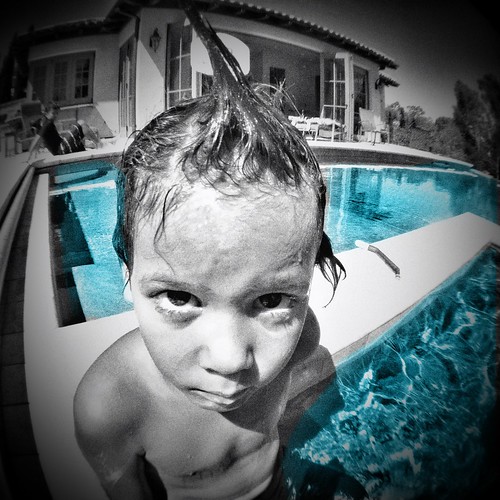
Photo taken on my #iPhone4 using the fisheye lens from the #olloclip Then edited using #snapseed for blackandwhite effect, #adobeideas to paint a blue layer, and #photowizard to blend the layers using the color blend mode.
Tuesday, June 19, 2012
Wednesday, June 13, 2012
Tech2Learn: Success Stories of Technology Integration in the Classroom | Edutopia
Tech2Learn: Success Stories of Technology Integration in the Classroom | Edutopia
Here's a peek into my classroom. How lucky I was to have such a great group of students this year! I miss them already. Thanks so much to Edutopia! It was an honor!
Here's a peek into my classroom. How lucky I was to have such a great group of students this year! I miss them already. Thanks so much to Edutopia! It was an honor!
Monday, May 7, 2012
Easy Line Drawings using Photoshop
One of the great things that came out of the Photoshop Evangelist Contest, is that I made a lot of new friends and learned some new tricks through the process. Eric R. (a.k.a. @tipsquirrel) was my toughest competitor, but one of these people. I must admit he made a fantastic, easy to follow tutorial. I know, because I used it! This is what I came up with. Fun for "kids of all ages" I'm sure anyone interested in learning Photoshop would enjoy learning too.

Sunday, April 22, 2012
As many of you may already know, this week has been very intense for me. I've pretty much put my life on hold until Monday night is over. The good news is, one of my latest Photoshop tutorials has been chosen as a finalist in the Photoshop Evangelist Contest. That's great! I'm proud, and I loved making my video. But now is the hard part, because I have to campaign so I can get it to win. Persuading as many people I know to take a minute out of their day each day to vote for it is a lot harder, and a lot less fun. So why am I doing this? Of course I have been asking myself this too, so I remembered another video I'd made and noticed that it was 2 months and 3 months ago that I posted it. Watching it again, I can see improvements I could make, but I still like it very much because I think it explains me and my motives very well.
See below.
But after watching it, I'm struck with the irony of the situation. This is not the first time I've done a campaign like this, nor is it the second. Those who have known me know that although I have had some successes, I've tried and failed many times before. It's not a good feeling. But I pick myself up and keep going. I carry on because I love the challenge and I love learning. I hope to lead by example so my students and my own children can learn from this. I still hold on to this idealistic view that I'm making a difference in the world as I do my best to inspire others.
For those of you who can appreciate my goals and my work, I hope that you will vote and continue to vote for my video today and tomorrow. Best wishes to all, and may the best video win. No matter what happens, I really appreciate the wonderful support and encouragement I have gotten from so many of you.
Be sure to use a computer (no phone or tablet) and here's the link to vote.
Thanks!
Nicole
Sunday, April 8, 2012
Hidden Gems: Rotoscoping in Photoshop CS5 Extended
Here's an easy fast paced tutorial on how to do rotoscoping, or frame by frame animation on a video clip using Photoshop.
Saturday, April 7, 2012
Hidden Gem: Make Stop-Motion Videos in Photoshop
Extended versions of Photoshop not only let you work with video, but they also work well with image sequences. Here's a quick tutorial to show you how to make a stop-motion video using Photoshop, and it also shows you how you can mask around the object to give it a transparent background.
For more information, check out this other tutorial of mine. It's slower paced, and somewhat similar.
For more information, check out this other tutorial of mine. It's slower paced, and somewhat similar.
Wednesday, March 28, 2012
Hidden Gems: Make "Cinemagraphs" using Photoshop CS5 Extended

Want to learn how to make something like this? Here's my fast-paced screencast tutorial using Photoshop CS5 Extended. It can be done in any "extended" version of Photoshop, CS3 Extended or higher.
Tuesday, October 25, 2011
iPhoneography - "Masking" Tutorial

Most of you know that I love editing photos in a creative way, and when I am not at home in front of my computer using Photoshop, I'm busy taking pics. and editing them all on my iPhone. This new found art, and my current obsession is called iPhoneography, and with all the incredibly cool apps. that are out there, you can do some pretty amazing things without even touching your computer. Now I've spent plenty of time exploring many of the free apps. that are out there, and that's a great way to get started, but for about $1-$2 a piece, you can do a lot more with just a couple of paid apps. Considering the low price, (if you already have an iPhone) it seems well worth the investment if this is something that interests you. And of course, as an advocate of integrating at least a little bit of creativity exercise into your life every single day, I think this is a perfectly easy way to do it!
Two of my favorite apps. are Camera+ and Photowizard. Not sure how to use them? Here's a tutorial on how to use some masking techniques. Enjoy! And if you like it, you might also want to visit me @magrelacanela on Instagram, my favorite free app. and iPhoneography social network.
Wednesday, October 12, 2011
Photoshop for Kids: Cinemagraphs Made Easy

New tutorial just posted on the Adobe Education Exchange. Here it is. It was made using Photoshop CS5Extended, but any full-version (extended) version of Photoshop will do. It's the beginning level tutorial for making "cinemagraphs" or animated .gifs. This one teaches simple frame by frame techniques, but there's lots of room for creativity! Consider doodles on your pictures, making them into moving digital paintings, or rotoscoping frames of video. These ones are pretty basic, but for more advanced techniques to create really stunning cinemagraphs, see my earlier post on cinemagraphs. Enjoy, and stay tuned for my next cinemagraph tutorial on how to create time-lapse cinemagraphs with Photoshop.

Wednesday, September 21, 2011
Photoshop for Kids: Pattern Blocks
This is a beginning level Photoshop tutorial for kids, but is fun enough for all ages. Taking an old concept/activity that kids are familiar with, these have now become digital pattern blocks. You will learn to make beautiful shapes and designs. There's lots of room for creativity! While learning basic geometry shapes and math skills, you can also learn to use some of the tools and commands that are commonly used in Photoshop. All the animations were done in Photoshop CS5Extended, so see the "Photoshop for Kids: Animation Made Simple" tutorial for information about animating your pattern blocks. The copy-right friendly Photoshop file that accompanies this tutorial is available for download on the Adobe Education Exchange.
edexchange.adobe.com/pages/home where you can share your own resources, or vote for your favorites. To win big prizes, submit your own resources by October 14th.
Tuesday, September 13, 2011
Photoshop for Kids: Digital Doilies
Call them doilies, snowflakes, or just beautiful tiles, this lesson integrates some geometry with basic Photoshop skills. No scissors required! It's fun and easy for kids of all ages. You can also find this on the Adobe Education Exchange where you will also find loads of other great resources for Adobe Educators. Enjoy!
PhotoshopforKids (of all ages): DigitalDoilies from NicoleDalesio on Vimeo.
PhotoshopforKids (of all ages): DigitalDoilies from NicoleDalesio on Vimeo.
Subscribe to:
Posts (Atom)





 Posts
Posts

