Monday, December 6, 2010

Photoshop for Kids: Animation Made Simple

Photoshop for Kids (of all ages): Animation Made Simple from magrelacanela (Nicole) on Vimeo.

Here's a tutorial that teaches basic animation concepts right inside of Photoshop CS5 Extended. You can animate each layer's position and opacity, as well as animate 3D objects. If you find this tutorial helpful, and use it, please send me a link to your samples. Thanks!

Monday, November 22, 2010

Just a few free/cheap resources for Digital Storytelling.

For those who aren't lucky enough to have cool software like iMovie, Premiere Elements, Camtasia, or even Power Point, there's always Brainshark. I like Brainshark for Digital Storytelling or even for creating online tutorials, and there are lots of reasons why I like it. First of all, it's FREE, and there is no software to download. It's also relatively easy to use, and it's easy to share your Brainshark presentations by emailing, posting a link, or by embedding it on your website. At first glance, it seems pretty simple and business-like, but I do believe there is a lot of potential for creativity here. Most importantly, it allows you to upload your own photos and then record your voice to match each slide. This way you can tell your story easily. There is even a small library of free, royalty-free music that you can add as background music, and that makes it all the more interesting. Lastly, if audio is what you want, you can download your audio recordings as MP3 files to use for podcasting. Cool! My sample video shows how these presentations can be done cheaply and easily using Brainshark combined with other free/cheap digital media making devices.

Sunday, November 14, 2010

Fotobabble and Psykopaint

Here's a digital painting that I made using a very cool and free online resource called "Psykopaint." I added audio using Fotobabble. It was lots of fun, and easy to make and share. For more details, listen to the audio recording.

Wednesday, October 20, 2010

Photoshop for Kids: Making 3D Objects

I love Photoshop, but I also love 3D...  Here's another tutorial for you.

Photoshop for Kids: 3D Objects from magrelacanela (Nicole) on Vimeo.

This tutorial teaches you how to make 3D objects from custom drawings, photos, or video clips in Photoshop CS5 Extended. (also can be done in PS CS4 Extended). This is a tutorial that covers the basics of working with 3D, and is appropriate "kids of all ages." It's a great way to integrate geometry and art. Enjoy!

Creative Commons Music downloaded for free at CC Mixter:
"I Like It Like That," by Stefsax

Wednesday, September 29, 2010

Photoshop for Kids: Patterns


Here's my latest tutorial - helpful for any math teacher that also teaches art and Photoshop.  Otherwise, I'm sure any digital scrapbooker would like this, as it teaches you how to make your own custom digital scrapbook paper.  This lesson can be modified to the skill level of just about any Photoshop user.


Photoshop for Kids: Patterns from magrelacanela (Nicole) on Vimeo.
Here's a beginning level Photoshop tutorial for kids. (of all ages)  This tutorial shows how to make patterns, and is great for a math lesson since children study patterns. It is also a fun way to design your own "wallpaper" or your customized digital scrapbook paper.  Enjoy!  Also, feel free to submit your pattern samples to me, and I will add it to the gallery and post it in my blog.

Thursday, September 23, 2010

DoInk - A great way to teach animation for kids

This site was so much fun, I spent some time playing around and even made my own animation sample.  After much discussion about the best ways to teach kids to do animation with my Google Certified Teacher group, many different sites/softwares were mentioned.  After going through them, DoInk is the one that I liked best for using with my students, and I will definitely be using this with my students.  It's like Adobe Flash simplified, so it's user-friendly, and a great way to teach kids basic concepts of vector drawing and animation.  The best part is that it is free, so this is a great option for our school.  I also like it because you don't need to download anything to your computer, so if you have internet, you are good to go.

You can try it out even if you aren't registered, but you have to sign up with an email if you would like to post your animations, share, or download them.  You can't add audio on the site, but your files which download as .swf files come can be opened and edited in Flash.  

When animating, you can choose between frame by frame animation, or by stacking each drawing on top of each other in a composition which becomes layers in a time line.  Some basic commands allow you to animate each drawing individually.  

Happy animating!

Here is my very first animation from DoInk:

Bee Positive! by magrelacanela, made at DoInk.com


Wednesday, September 8, 2010

Photoshop for Kids: Silhouettes

Thanks to the Google Certified Teacher network, I recently discovered the Adobe Education Exchange. Here I discovered a whole new world of Adobe resources, but also a whole new crowd of like-minded digital creatives. They had a challenge to share resources, so I submitted my "Photoshop for Kids (of all ages!)" tutorials and created a new batch to go with the ones I already had. I'm thrilled that Adobe and the other Adobe teachers received them well, because I won! I earned 1st, 2nd, 7th, and 9th place! The 1st place winning resource was a tutorial that I previously posted here called Photoshop for Kids: Scratch Art, and the second place was a new tutorial I made called: Photoshop for Kids: Silhouettes. It's on my new channel on Vimeo called:
Photoshop for Kids (of all ages!)
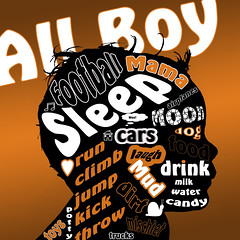
Once I get my prize, a copy of Adobe's Master Collection, I'll certainly be making plenty more. For now, here's 2nd place: All Boy Thoughts

Photoshop for Kids: Silhouettes from magrelacanela (Nicole) on Vimeo.

Photoshop for Kids(of all ages) Here's a great Photoshop project that's great to do with kids or adults, and is suitable for just about any level of Photoshop user. This can also be modified as you like to work into a language arts lesson if you add words or pictures on top of the silhouettes.

Enjoy, and if you make any silhouettes of your own using my tutorial, please send me a link/copy of what you did to add to my collection.

Music from Jamendo's Creative Commons collection: "Deep Sea Diver" by Heifervescent